- AI with Kyle
- Posts
- AI with Kyle Daily Update 168

I sat down this morning with zero slides prepared for my livestream. Sixty minutes later I'd done a full presentation - with a proper slide deck, live on camera, in front of an audience.
I do this daily.
How?
I use NotebookLM. It's free. It's from Google.
I’m going to show you how to get started with it. And give you an example workflow + advanced tips if you already use NotebookLM.
I've attached the slide deck from the stream below.
What NotebookLM actually is
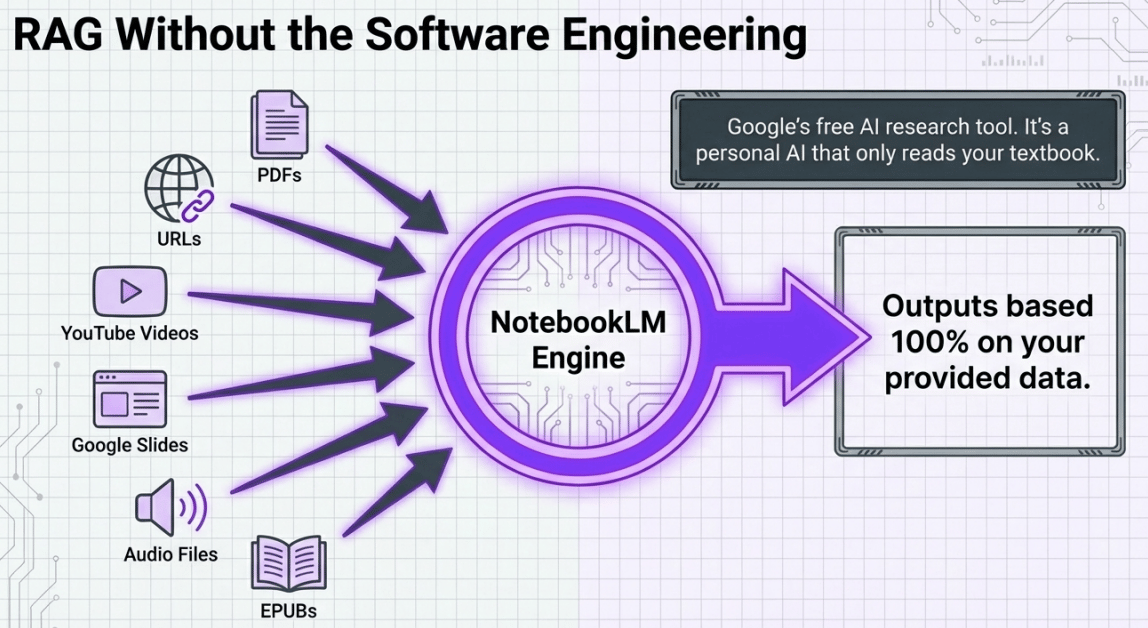
NotebookLM lives at notebooklm.google. It's free. No subscription. No coding. You feed it your sources - PDFs, YouTube videos, URLs, audio files, EPUBs, slide decks - and it becomes an AI that ONLY knows about your stuff.
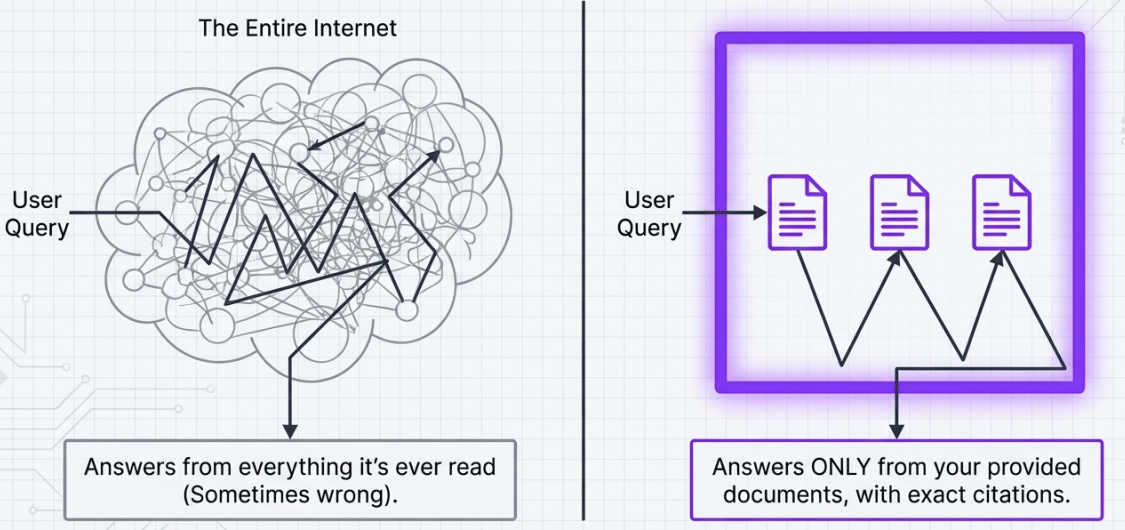
That's the key bit. A normal LLM like ChatGPT or Claude pulls from everything (EVERYTHING) it's ever been trained on. That's billions of pages of internet.
Sometimes we don’t want that.
Sometimes it’ll mean the AI gets confused. Sometimes it makes stuff up.
NotebookLM can't do that. It only answers from the documents you've given it. If the answer isn't in your sources it won’t just make stuff up to fill the gap.
This is what enterprises call RAG - Retrieval Augmented Generation. Big companies spend hundreds of thousands building custom RAG systems for their internal docs. NotebookLM gives you the same thing for free.
RAG without the headache
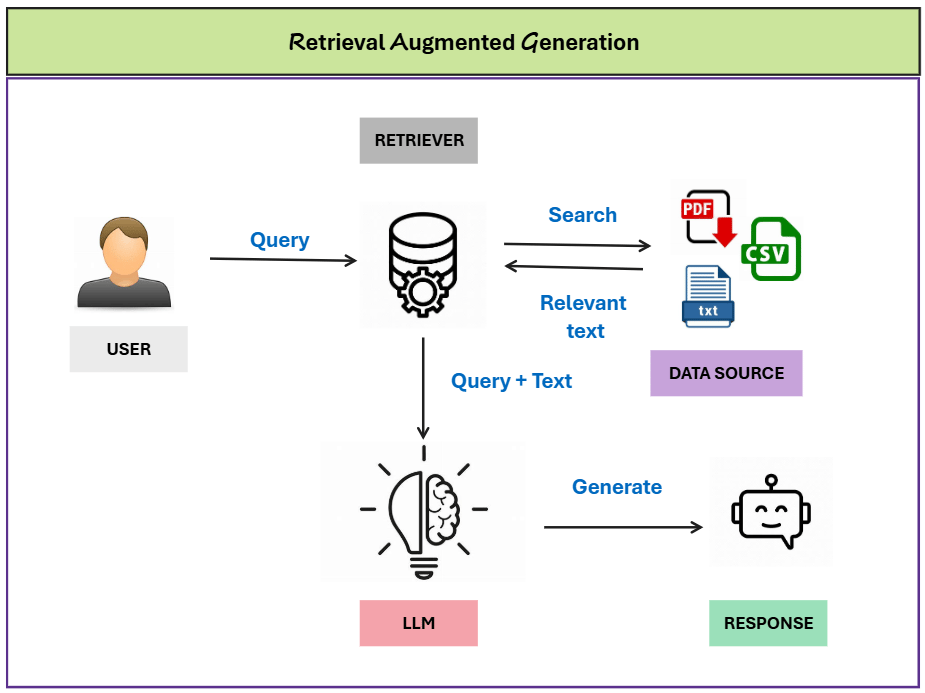
RAG stands for Retrieval Augmented Generation. Fancy sounding but it’s not too complex.
Normally when you ask an AI a question, your prompt goes straight to the model. With RAG, there's an extra step. The system first looks up relevant information from a specific set of documents, then combines that with your question before sending it to the AI.
That’s sorta it.
Enterprises use this for SOPs, contracts, FAQs, internal knowledge bases. Basically when you want AI to answer based on specific facts - not just have a go and make stuff up!
Companies also pay consultants a fortune to set it up.
NotebookLM does the same thing automatically. You don't need to understand vector databases or embedding models or any of that. You just upload your stuff and start asking questions. Don't get hung up on the technical name - I just wanted you to understand why this is different to other AI tools. All you need to know is this - what goes in determines what comes out. Good sources in, good answers out. That's it.
The three-panel setup
The interface is dead simple. Three panels.
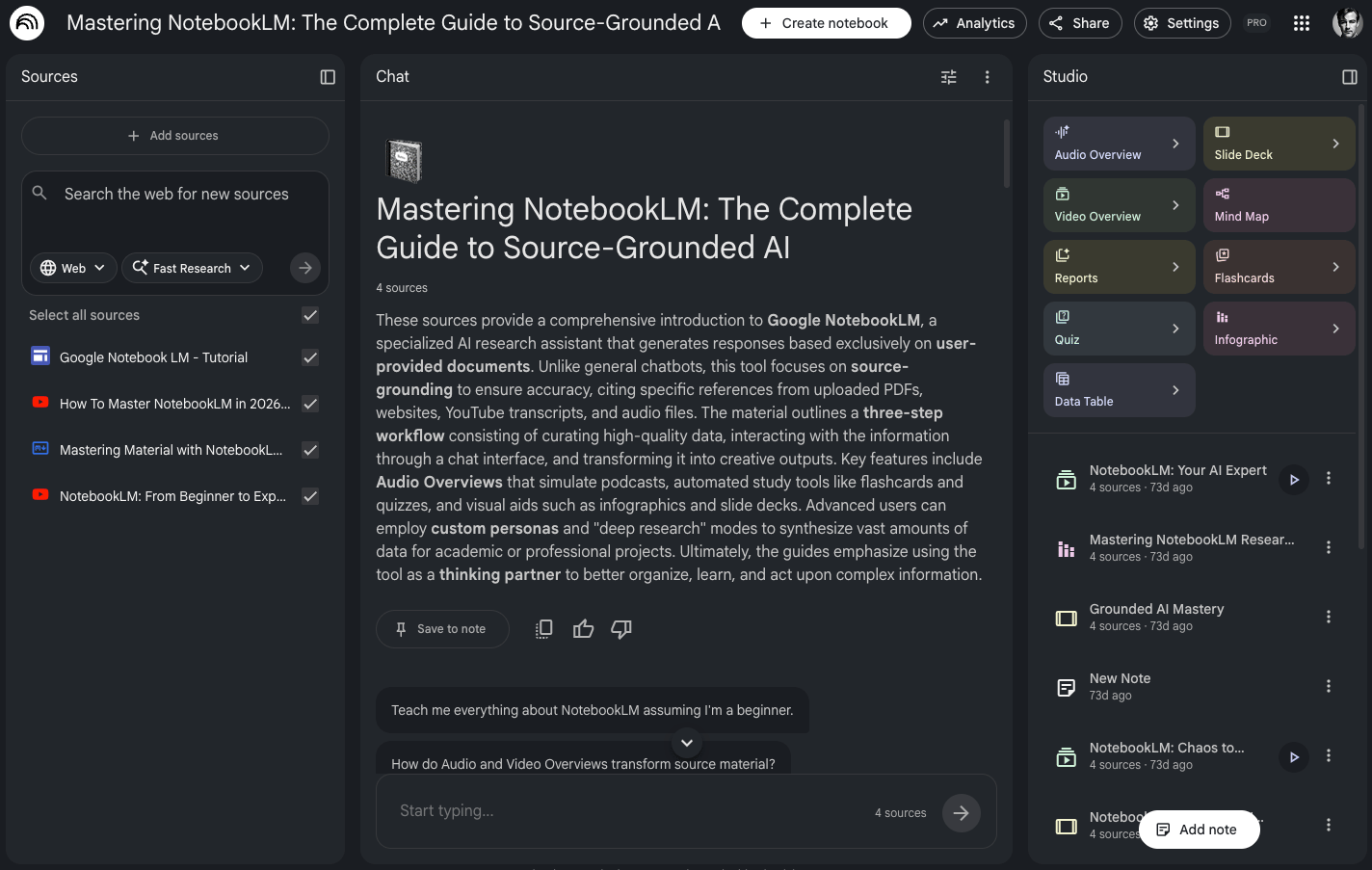
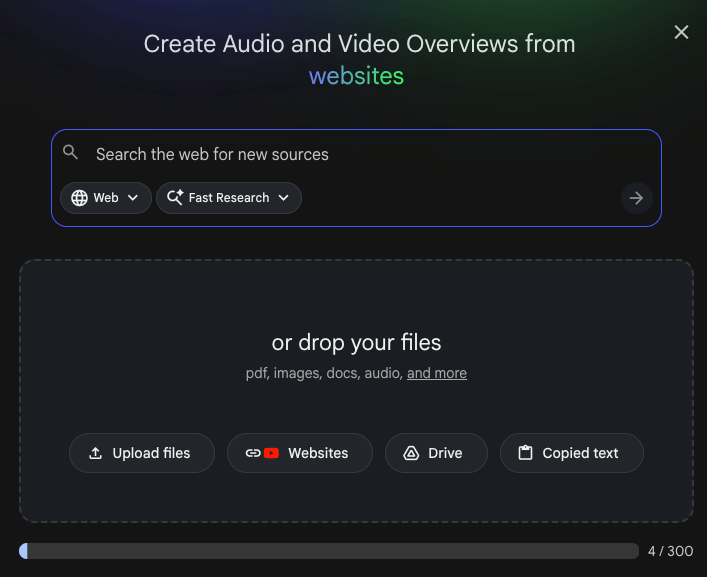
Left panel: your sources. Thisis where you upload documents, paste URLs, add YouTube videos. You can add 300 sources (right now, it keeps increasing). But don’t!
One tip - keep it focused. Don't dump 50 random documents in there. One to two sources per notebook works best. You want specificity, not a junk drawer. Otherwise you are negating what makes NotebookLM so useful!
Middle panel: the chat. Nice and easy. This is where you talk to your sources. Ask questions, get summaries, use it as a learning companion. Every answer comes with citations so you can click through to the exact part of your source.
Right panel: Studio. This is where it gets powerful. The good stuff.

This is where we generate learning artefacts. The exact list keeps growing. And the quality keeps improving. So go and have a poke around and generate one of each. I’ll give a quick overview of the current menu though!
Way more than a podcast generator
Back in 2024, NotebookLM went viral because of Audio Overviews - those AI-generated podcast conversations about your documents. People thought that was the whole product.
It was cool. I guess? But after the initial “woah” moment I’m not sure how many people actually used it. There’s better stuff here!
It's now powered by Gemini 3 + Nanobanana and the output options are stacked. You get:
Slide decks with PPTX export (the one I use daily for my livestreams)
Cinematic video overviews
Infographics in 10 different styles
Mind maps and data tables
Interactive audio you can actually interrupt and join
Reports, quizzes, and flashcards
Deep research integration
Here’s an example of the video outputs by the way:
Importantly…and this cannot be overemphasised! Every single one of these is generated from YOUR sources. Not from the internet. From the specific documents you uploaded.
Live Example: Content Creation
Here's the strategy that ties it all together. You take ONE piece of content - a YouTube video, a blog post, a transcript - and feed it into NotebookLM. From that single source you get two categories of output.
Here’s the process with a Youtube video but you could easily do this with one of your blog posts or indeed any content.
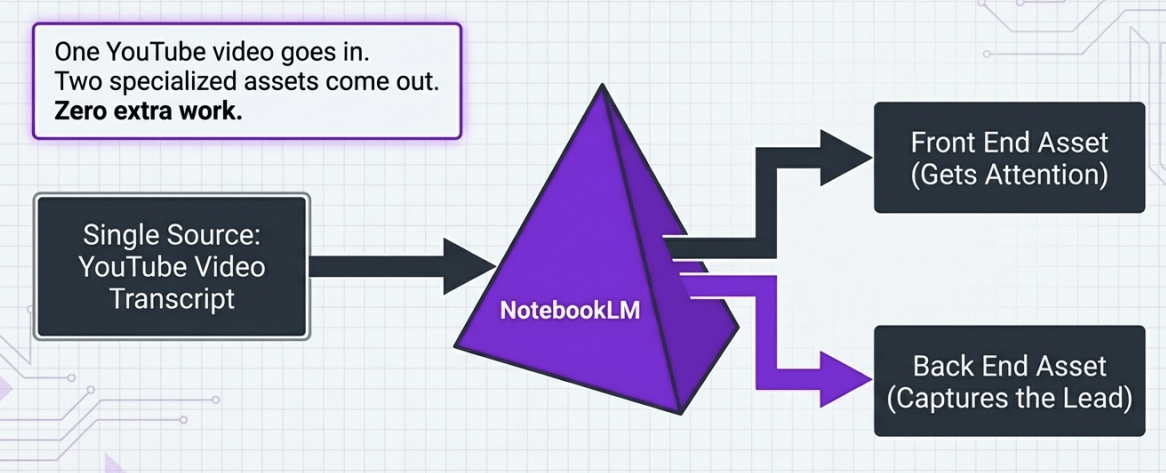
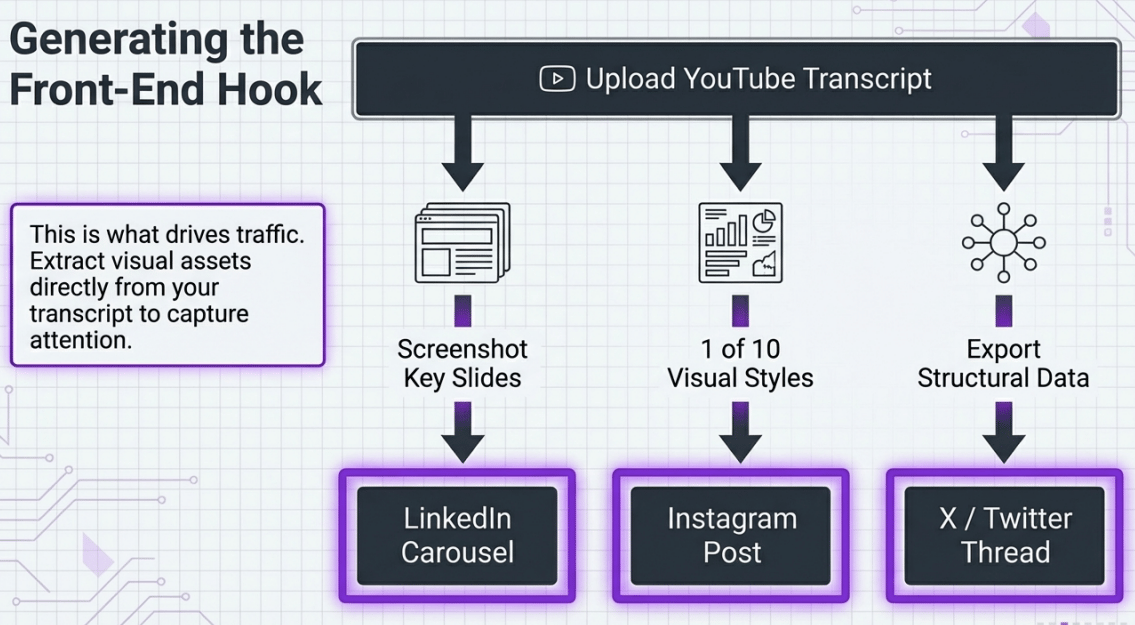
Front-end assets: infographics, social media visuals, carousel-style content. These are attention-grabbers. They drive impressions on Instagram, TikTok, LinkedIn. They get eyeballs.
Back-end assets: detailed PDF guides, study guides, cheat sheets, full reports. These are the valuable stuff. You gate them behind an email capture. Someone sees your infographic, wants the full guide, gives you their email address.

One source in. Two types of assets out. The front-end gets attention. The back-end converts that attention into leads.
This is how I build my email list. I'm getting a couple hundred new subscribers per day using this approach. The lead magnet perfectly matches the social content because it IS the same content, just repackaged into a different format. There's no disconnect between what people see on social and what they get when they sign up.
The reason this works so well is alignment. If someone watched my video about Open Claw, they're interested in Open Claw. So a detailed Open Claw guide is exactly what they want. You're not offering some random "Top 10 AI Tools" PDF to someone who clicked on a specific topic. The content matches. That's why the conversion rate is solid.
The cheeky move
Alright so what if you don’t have a Youtube video or blog article to feed into the top of this machine?
This one's a bit spicy. You can take ANY public YouTube video and feed it into NotebookLM. Not just your own.
Say you're an accountant. You find a video called "UK Tax Changes 2026" that's got 100k views. Clearly there's demand for this topic. You feed that video into NotebookLM and generate a branded report focused specifically on your niche.
Now you've got a professional-looking lead magnet that's relevant to a proven topic (super important!), branded to your business, and created in minutes. You share that on your social channels, gate it behind an email capture, and you're building a list of exactly the people you want as clients.
Don’t just copying anyone's work. Instead provide extra context and shape the material to your particular audience. NotebookLM can help synthesising and restructuring the information into something new. It's no different to watching a video, taking notes, and writing your own version. It just takes five minutes instead of five hours.
I know some people will feel weird about this. But think about how content has always worked. Every blog post references other sources. Every presentation builds on existing knowledge. You're adding your brand, your perspective, your niche focus. That's the value. NotebookLM just removes the manual labour and makes the process hyper-fast.
Controlling and customising the output
The outputs aren't just fire-and-forget. You've got a few ways to steer them.
One that works very well (and is non-intuitive!): Add notes as sources. If you want to nudge the direction, write a note with your key points and convert it into a source. NotebookLM will weight it alongside your other documents.
Specify branding in your generation prompt. Tell it "clean white slides with purple highlights" or "professional but casual tone." It follows these instructions reasonably well.
Keep sources small and focused. The more sources you add, the more generic the output gets. Two focused sources beat twenty scattered ones every time.
Custom chat configuration changes how the AI responds in the chat panel. You can set a persona, define topics to focus on, specify the audience.
You can edit and revise after generation too. The slide editor is a bit clunky but it works. And it’ll probably get a lot better!
And again: the biggest mistake I see people make is overloading it. They dump in everything they've ever written and expect magic. Less is more with NotebookLM. Pick one or two specific sources and let NotebookLM go deep on those rather than spreading thin across fifty documents.
Automating the whole pipeline
For the nerds in the room (hi!) - you can automate this. There's an unofficial Python API called notebooklm-py on GitHub (teng-lin/notebooklm-py). You can connect it to Claude Code for post-processing.
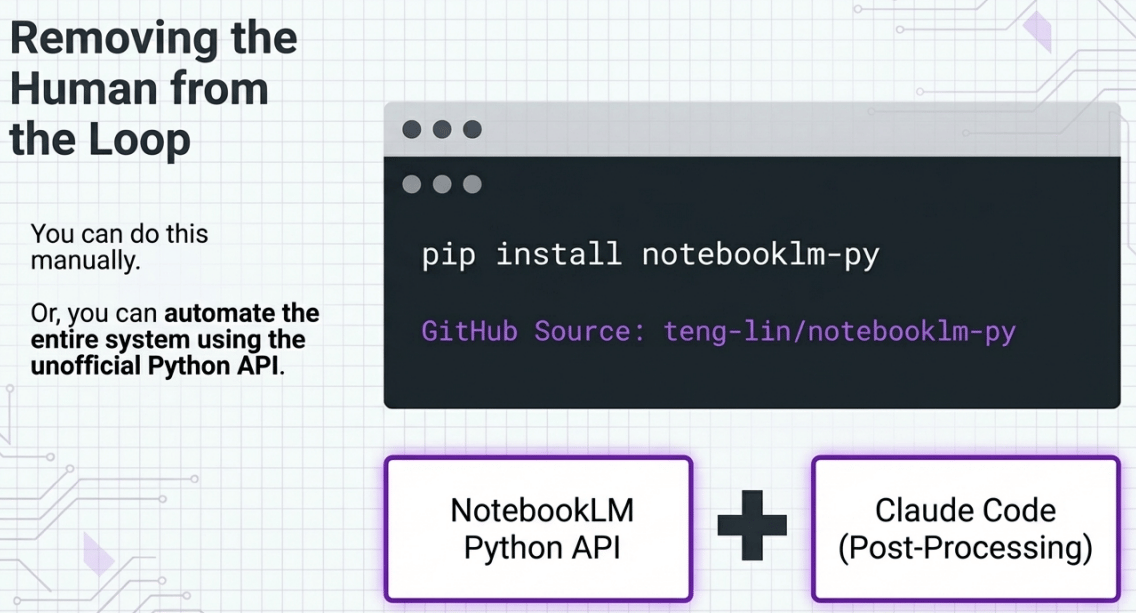
I've been building a five-station pipeline:
Trigger - a new YouTube video gets published
Engine - notebooklm-py creates a notebook and adds the video as a source
Generation - automatically creates a slide deck and PDF guide
Refinement - Claude Code post-processes the assets, cleans them up, adds branding
Deployment - auto-routes the finished assets to social media and email opt-in pages
A research agent finds trending topics and feeds those into NotebookLM via the API too. So the system isn't just packaging my existing content - it's finding what people want to learn about and creating resources for those topics.
This is advanced stuff. You absolutely don't need to do any of this to get value from NotebookLM. But if you're the type who likes to build systems, this unofficial tool makes it possible.
This pipeline turns content creation from a daily grind into a mostly automated system. BUT don’t just automate everything! You’ll make your content dull and flat. I still present live - that's my thing, that's the human part. It provides the human in the loop uniqueness.
Member Questions
"Isn't this just AI slop?"
I get why people ask this. But no. The slides are based on MY thoughts, my teaching, my YouTube videos. The act of presenting - live, on camera - forces me to think through the material properly. Using AI to turn educational content into different formats for your business isn't slop. Slop is when there's no original thought behind it. There's plenty of original thought here - NotebookLM just helps me package it.
Resources from today's stream:
NotebookLM Content Engine PDF guide.
NotebookLM: notebooklm.google (free)
notebooklm-py API: github.com/teng-lin/notebooklm-py
Kyle