- AI with Kyle
- Posts
- AI with Kyle Daily Update 164


People keep asking me what tools to use to build my business.
On the livestream I walked through the exact toolkit I use to go from idea to live, paying product. The whole thing costs about ten bucks to start.
I've attached the slide deck from the stream below and there's a PDF checklist you can grab to.
The Vibe Coder's Toolkit: One tool per job, nothing else
If you Google "how to build an app" and you get hit with 47 different tools, three competing frameworks, and someone telling you to learn Docker before you've even made a button. It's paralysing.

So I stripped it down. One tool per job. Seven steps from idea to live product.

These are my tools.
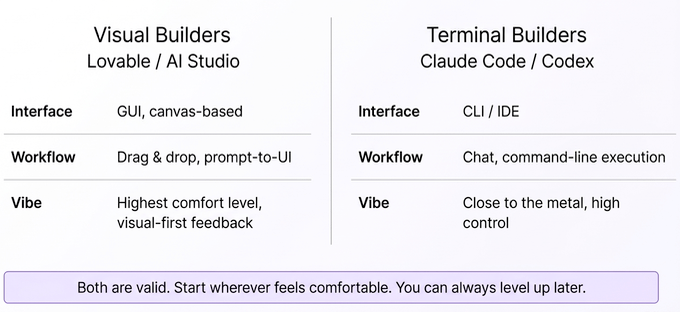
Build it - Lovable ($20/mo) if you're starting out. Google AI Studio Build Mode if you want free. Claude Code or Codex if you're more advanced and want full control. This is the step with the most variants - depending on your i) tech level and ii) budget.
Save your work - GitHub (free). This is your central repo. Everything else connects to it. Think of it as the hub that all your other tools plug into.

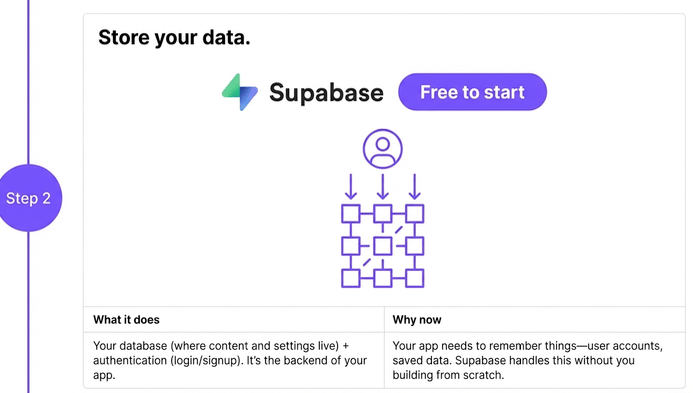
Store your data - Supabase (free to start). Database plus authentication - so your users can sign up and log in. Free up to 50,000 monthly active users. You're not hitting that limit any time soon.
Deploy it - Vercel (free to start, $20/mo later). It takes your code from GitHub and puts it on the internet. Every time you push a change, it auto-deploys. Netlify works too.

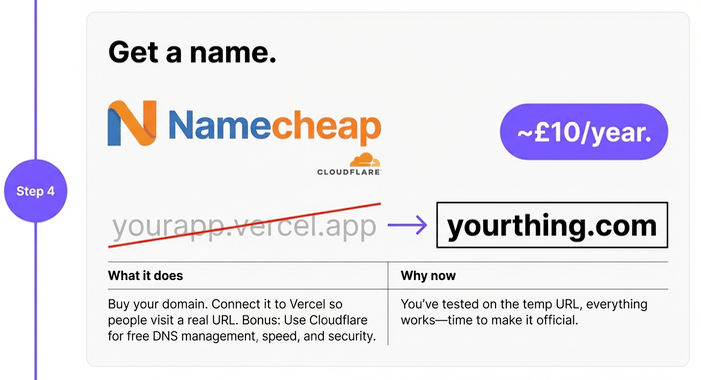
Get a name - Namecheap for the domain (~£10/year). This is the ONLY thing you actually have to pay for on day one.
Get paid - Stripe (2.9% + 30p per transaction). If you want something more sophisticated with upsells and bump offers - ThriveCart at $495 one-time. But Stripe alone works fine to start.

Send emails - Two types. Resend for transactional stuff (password resets, receipts). Beehiiv for marketing and newsletters - free up to 2,500 subscribers.

Know your numbers - PostHog (free) for internal product analytics - what are users clicking, where do they drop off. Google Analytics (free) for external traffic - where are people coming from.

What this actually costs
Total to get started: about £10 for a domain name. Everything else is free until you have thousands of users paying you money. At which point you can afford the $20/month tiers.
I run a six-figure business on this stack. My monthly tech costs? About $100-200. That's it. No £5000/month enterprise tools. No expensive agencies. Just this list.
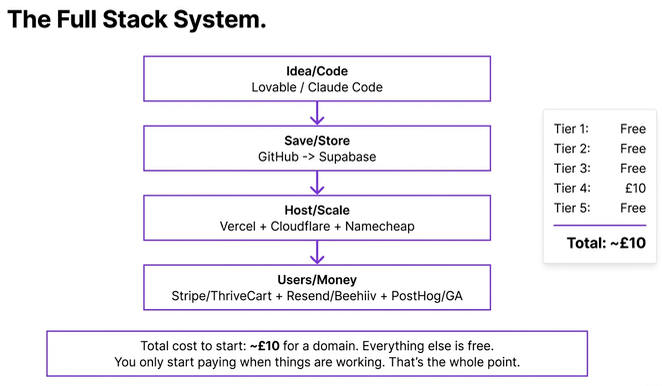
The first time you set all this up it'll take about a week. Connecting GitHub to Vercel. Setting up Supabase. Getting your domain pointed at Cloudflare. It’s a learning process!
BUT…
After that? You’ll know what you are doing. So any future builds will be much much faster. I can launch a new product in about 2 hours. Seriously. It’ll become second nature.
This means that every excuse is gone now. Cost? Ten quid. Technical ability? These tools are designed for people who can't code. Time? A week to set up, then 2 hours per product.
If you've been waiting for the "right time" to build something - this is it.
THIS is the sign.
The master prompt to kick it off
I shared a prompt at the end of the stream that ties this all together. Something like:

"I want to build [describe your app]. Create a step-by-step project plan using this stack: Lovable for building, GitHub for version control, Supabase for database and auth, Vercel for deployment, Namecheap + Cloudflare for domain, Stripe for payments, Resend for transactional email, Beehiiv for marketing email, PostHog for analytics."
Paste that into Claude or ChatGPT with your idea and it'll map out the whole build for you and give you a step by step project plan. It's the starting point for everything.
Don’t understand something it tells you to do? ASK how to do it. AI will help guide you through everything.
Member Questions
"Should I start with Lovable or Claude Code?"
If you're new to building - Lovable ($20/month) or Google AI Studio Build Mode (free). They're visual. You can see what you're making. Claude Code is for when you want more control and you're comfortable working in a terminal. Start simple, graduate later.
"What about free apps? I don't want to charge."
Use GitHub Pages for hosting (completely free). Add a Buy Me A Coffee link if you want donations. Loads of tools have nonprofit pricing too. You can ship something useful for literally zero cost.
Resources from today's stream:
PDF checklist with all tools linked in the checklist with direct URLs
Want the full unfiltered walkthrough? Join me tomorrow for the daily AI news live stream where we dig into the stories and you can ask questions directly.
Kyle