- AI with Kyle
- Posts
- AI with Kyle Daily Update 146
AI with Kyle Daily Update 146
Today in AI: How to build a website using AI

Kyle Balmer
February 24, 2026
What’s happening in the world of AI:

Highlights
🌐 Building Websites with AI: The Complete Guide
People keep asking me: how do I build a website with AI? It sounds simple. It gets complicated fast. There are dozens of tools all screaming for your attention, and if you pick the wrong one you'll waste weeks building something that Google can't even see.
So I put together a guide to cut through the noise. Here's everything I've learned building sites with AI over the last couple of years.
The AI Website Landscape

It’s kinda busy!
There are three camps right now. Sorta.
Builder platforms like Wix, Squarespace, and Framer. These have been around for years and they've bolted AI on top. Wix bought Base44 (a vibe coding tool) and brought it in-house because they could see the direction things were heading. If you just need a business site up and running for $20-30 a month, these still work. Nothing wrong with them.
Then you've got the vibe coding tools. Lovable, Bolt, V0, Replit. These are the new kids. Brilliant for building apps quickly. But they're not necessarily the right tool for building a website. More on why in a second.
And then the proper dev tools. Cursor, Claude Code, Codex. More powerful, more complicated. This is what I personally use for serious projects.
The confusing bit is that some tools blur the lines. Replit hosts for you and gives you code. Framer exports clean code but is still a builder. V0 generates components but you assemble the project yourself. It's a messy landscape and every one of them is marketing at you claiming to be the best tool for the job.
They might not be. It depends. Not on the tech. But on what you want to DO. You need to start with what you're actually trying to build.
Website vs Web App: The Question You Need to Answer First

Before you touch any tool, answer this: are you building a website or a web app?
Huh…what’s the difference? Even this question is a little fuzzy nowadays. But let’s give it a shot.
A website is mostly static. Think of it like a pamphlet. Information people can read. A blog, a portfolio page, a company brochure. The server sends ready-made HTML and that's pretty much it.
A web app is interactive. User accounts, payments, dashboards, streaming video. Amazon looks like a website but there's a massive application running behind the scenes. Same with Netflix. You go to netflix.com and it feels like a website, but powering all of that is a proper piece of software.
If you're just building a basic page that talks about you, your services, maybe has a contact form, you don't need a web app. You can get away with a simple website.
The reason this distinction matters is Google. We’ll take a quick technical detour.
The SSR vs CSR Problem (Why Google Can't Find Your Site)

This is the bit that can mess you up.
When you build with a tool like Lovable, you get a client-side rendered (CSR) app. Generally made in something called React, which is a javascript library. Don’t worry about the details here.
When a normal visitor arrives at your page, the application runs in their browser and they see everything. Blog posts, images, videos, the lot. They have no idea it's an app rather than a webpage. It all looks the same to them.
When Google arrives at that same page, it sees a blank page and a few lines of JavaScript. Your blog articles, your resource pages, all that content you spent hours writing? Invisible. Google can't read it because the content only appears after the JavaScript runs, and Google's crawlers aren't great at waiting around for that.
Half the questions on Lovable's subreddit are people asking why Google can't find their site. This is why. They built a web app when they needed a webpage.
Yes, there are workarounds. Yes there are ways to fix it. But those exist because the wrong tool was used in the first place. Easier just to build it with this in mind!
If you need to rank on Google, you need server-side rendering (SSR). The server sends ready-made HTML. Google reads it instantly. No waiting, no executing JavaScript, no problems. This lets Google “see” the contents.
Google’s bots need to be able to “see” your content so they can tell what’s on the page and know what search queries it is relevant to and how to rank it. Without this information Google just won’t show the page.
What Do You Actually Need?
It depends! Lets run through some potentials.
Landing page to test an idea? AI tools are perfect. Ship it in an hour. This is exactly what I talked about in last week's guide on validating ideas. Throw up a sales page, run some ads, see if anyone cares. Don't worry about SEO for this.
E-commerce? Just use Shopify or some other eCom tool. For your sanity! Don't vibe code your own checkout. Building e-commerce is complicated and high risk. If your AI-generated code leaks a customer's card details, that's on you. I personally use ThriveCart (one-off lifetime licence, about £1,000) but Shopify is the safe default. Just because you can build it yourself doesn't mean you should.
Web app or SaaS? This is where vibe coding tools shine. Lovable, Bolt, Claude Code. Go for it.
Blog or content site? If you're relying on Google to send you traffic, don't use a vibe coding tool. Your content won't rank. Same goes for directory sites. They live and die on SEO.
Two Paths: Just Ship It or Build It Proper
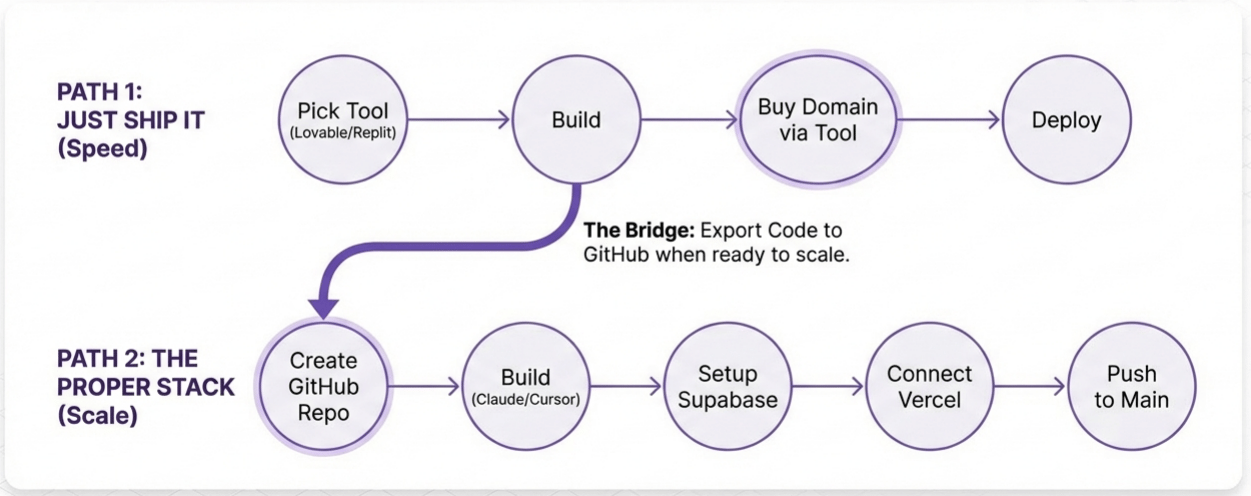
Path 1: Just Ship It. Use Lovable, Replit, or Bolt. Build your site. Buy a domain through them for about £10 a year. Click deploy. Done. You're live.
I highly recommend this for your first project. Don't worry about SEO. Don't worry about whether it's the most optimised tool for the job. Just build something and get it out the door.
Path 2: “Proper”: Stack. Create a GitHub repo. Build with Claude Code, Codex, or Cursor. Set up Supabase for the backend. Connect Vercel to GitHub. Push to main and it auto-deploys. Buy a domain, point it to Vercel.
More steps, more power, more control. All good stuff but more complex!
So…. start with path one, move to path two when you need to. Build your prototype in Lovable or Bolt or Replit. If it turns out to be worth scaling, push the code to GitHub and pick it up in Claude Code or Codex. Then you are only polishing and scaling what's actually worth the effort.
This is exactly what I did with aiwithkyle.com. Built the prototype in Lovable. Shipped it fast. Validated the idea. Then pushed to GitHub and rebuilt properly with Claude Code when I knew it was a goer.
Yes the migration and rebuild (refactor) takes time. BUT at least it’s being done for a project that is worth the work. Critical!
Where Does Your Site Live?
A quick note on how we actually make a website visible. Your site needs a host and your data needs a backend.
If you use Lovable or a similar beginner-friendly tool you literally click “Publish” at the top right of the screen and Lovable deals with all this.
If you are going more custom and complex you’ll need to sort this stuff out yourself.
The reason we need hosting and a database is our website files need somewhere to live where they can be accessed by visitors from around the world. People don’t access the website files from our computer (thankfully!) but instead from a server that you rent.
Generally you’ll have your website files in one place (the host) and the database in another (the backend). We split them up because if it’s on one server that’s a huge security risk (amongst other reasons).
For hosting, I use Vercel. It's brilliant for Next.js projects, has a generous free tier, and auto-deploys whenever you push code to GitHub. Netlify is similar. Cloudflare Pages is fast with a generous free tier. All fine
For backend and database, I use Supabase. It gives you a Postgres database, authentication, and file storage. Free to start, about £20 a month when you scale up. Firebase is Google's equivalent. Convex is newer but I've heard good things.
People will (and do) argue over their favourite backend and their favourite hosting services. Honestly that’s not a hill I’m interested in dying on. There are lots of options!
My recommended starter stack: Supabase + Vercel. Covers 90% of use cases, generous free tiers, great documentation. But use what you want!

And remember you don't need to worry about any of this if you're using path one! This only matters when you're ready to build something more sophisticated.
The best website is the one that's live. Not the most sophisticated. Not the one you've spent months tweaking with the most advanced AI tools on the most optimised database.
Build fast. Ship fast. See if anyone cares. Scale what works. Scrap what doesn't.
Don't let perfect be the enemy of done.
Member Question from Serban: "I built an all-in-one platform with an agent that can generate contracts, also Gmail integration."
Kyle's response: Two things. First, be careful with Gmail. Google just banned someone's account for connecting it to OpenClaw, apparently after only five emails. We might see the same pattern as Anthropic stomping on third-party tools.
Second, be wary of all-in-one platforms. Zoho for example does everything and nothing well. I briefly put my business on it and it was painful. Focus on doing one thing brilliantly. Your customers can build their own tools with Claude Code now, so you need to do your one thing better than they could build themselves.
Member Question: "How do you validate ideas and what about distribution?"
Kyle's response: Don't build in secret for 12 months. Spend a couple hundred quid on Meta ads pointing at a landing page. $10 a day for a week. If nobody signs up, you've lost £200 instead of a year of your life. When I launched my workshop licensing programme, I didn't build it first. I posted a TikTok saying "would anyone be interested in this?" Got 200-300 people saying yes. That led to around half a million in revenue. Find the market, then build the product.
I also covered this in (great!) detail last week - How to Validate Business Ideas using AI.
Streaming on YouTube (with full 4k screen share) and TikTok (follow and turn on notifications for Live Notification).