- AI with Kyle
- Posts
- AI with Kyle Daily Update 132

What’s happening in the world of AI:
Highlights
🖥️ OpenAI's New Codex App: Free AI Coding for Everyone
OpenAI dropped something big yesterday. The new Codex desktop app for macOS is now available.
And it’s free for everyone, at least for now. If you've got a ChatGPT account, even a free one, you can download this and start building software.
I was on a call last night with the Codex team and asked how long it’ll be free for and they said until beginning of April - you’ve got 2 months to use this on your free ChatGPT plan!
I've been telling people for months that if you want to learn vibe coding without paying anything, use Google's AntiGravity. That was my go-to recommendation because Google had released a version with free AI usage.
Now we have a proper free alternative from OpenAI.
Kyle's take: I spent my entire live stream building an RSS reader app with this thing, and I'm impressed. The app lets you run multiple coding agents at the same time, each working on different tasks. You can set up automations that run in the background on a schedule. And they've doubled the rate limits for paid users for the next two months.
The app worked. I built a Tinder-style RSS feed sorter where I could swipe through articles and pick which ones to cover on my show. It took less than an hour, and most of that was me talking to camera rather than actually working. Could I have done this in Claude Code? Yeah, a hundred percent. But Claude Code costs $100-200 a month realistically, whereas this is free. Big difference.
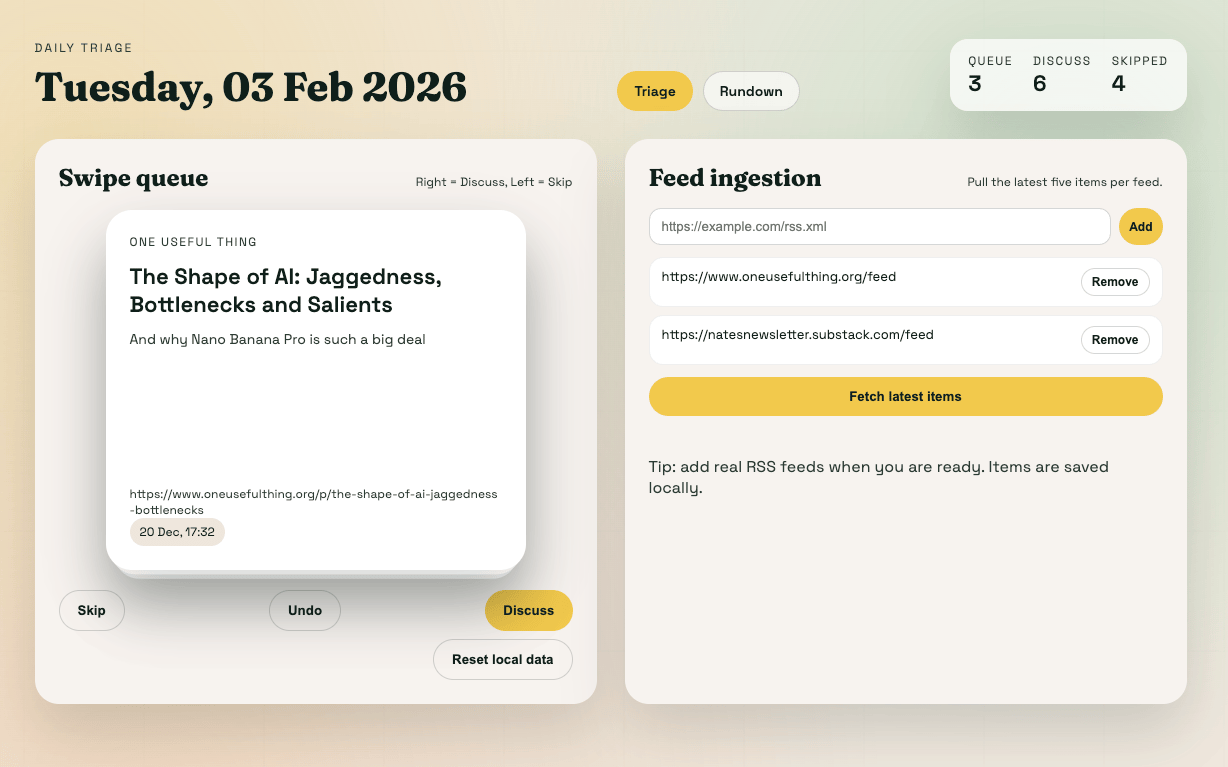
A quick vibe coded RSS reader with Tinder swipe interface
The downsides? No preview panel, which means you have to mess about with terminal commands to see what you've built. I asked the Codex team if there’s a way to preview and the answer is nope - BUT for people comfortable with code, that's fine.
For people coming to vibe coding for the first time, as soon it says "open terminal and run python3 -m http.server 8000" they're going to bounce off hard. That's what makes tools like Lovable and Replit easier for beginners! So Lovable is probably still the front-runner if you don’t mind paying.
The other “"negative” I found was speed. Tasks that would take a couple of minutes in Claude Code can take 10-15 minutes here. That said: Codex gets things right. It’s more suited for a set and forget rather than fully hands-on interative process as far as I can tell. So set up lots of tasks and go off to do something else then come back to move to the next stage.
Source: OpenAI Codex App announcement
🔧 What Actually Makes Codex Different
A few things stand out. First, the "Skills" feature lets you package up tools and workflows that Codex can reuse. Think of it like teaching the AI your preferences once so you don't have to repeat yourself. Second, the automations. You can set Codex to run tasks on a schedule in the background. This is what a lot of people are trying to get out of Clawdbot, just without the security nightmare.
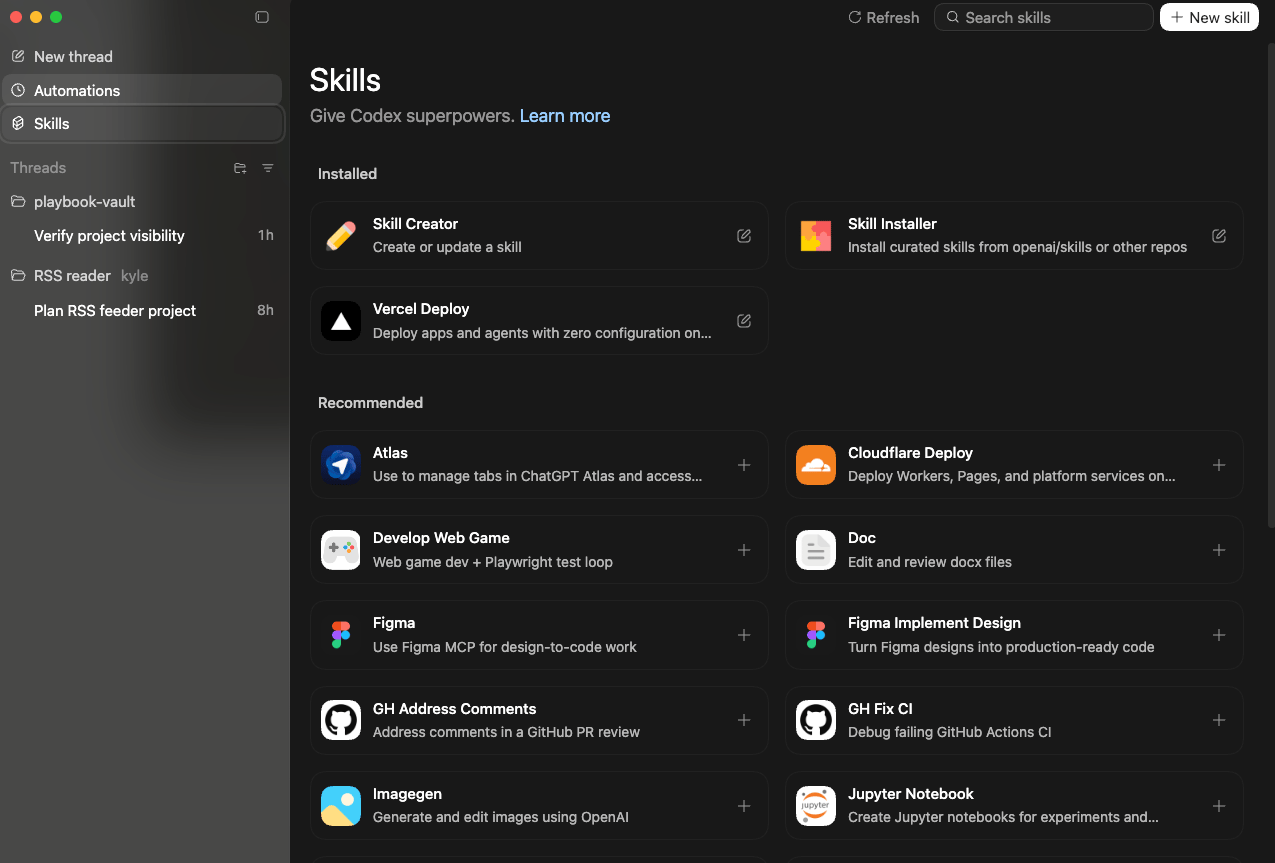
Yes, sure, you can get skills and automations working in the cloud version of Codex but they’ve really brought them to the forefront here in the app and made them super easy to set up.
Speaking of Clawdbot, here's something interesting: Clawdbot was built entirely in Codex. The creator rates Codex above Opus for coding work. That's a strong endorsement!
The Codex app organises everything into projects and threads, so you're not drowning in a mess of conversations like the main ChatGPT interface. You can connect to GitHub for version control. And you can export your work to Cursor, VS Code, Windsurf, Anti-Gravity, or Xcode. They're not locking you into their ecosystem, which is smart.
One thing that's broken right now: the Skills marketplace won't load. Not a great start for a brand new product, but I'm sure they'll fix it. Update: the head of Developer Experience Dominik diagnosed the problem whilst I was on a call with their team about the launch and then Codex fixed the issue. All whilst we were chatting… talk about service ha!
Source: OpenAI developers documentation
📰 Why I Built an RSS Reader (And Why You Might Want One Too)
The project I built on stream wasn't random. It came from a tweet by Andrej Karpathy where he said he's going back to RSS and Atom feeds because there's "higher quality, long form, and less slop that's intended to provoke." He's basically saying get off Twitter, the algorithm is designed to make you angry, and RSS lets you choose exactly what you want to read.
Kyle's take: Karpathy's right. Any product with the same incentive structures will eventually converge to the same attention-grabbing nonsense. RSS is open, hackable, and puts you back in control of your information diet.
I use NetNewsWire personally, which has been around for about 20 years. But Karpathy suggested you could vibe code your own RSS reader, which is exactly what I did. Live on the stream! Built a tool that pulls in feeds from sources I trust, lets me swipe through articles Tinder-style (right for yes, left for no), and creates a daily rundown for my show. The whole thing works, pulls in real data, and I can reorder my topics by dragging them around.
This is the kind of personal tool that would have taken days to build a few years ago. Or been impossible without coding knowledge. Now it's an hour. And that's the point of vibe coding: building stuff that's useful specifically for you, without needing to be a professional developer.
⚠️ The Catch: Windows Users Left Out (Again!)
The Codex app is macOS only. Windows is "coming soon." They always say that, and it always takes forever.
Kyle's take: Every AI company releases for Apple first, probably because they're all Apple users themselves… It's frustrating if you're on Windows, but you're not completely locked out. The cloud version of Codex still exists at chat.gpt.com, and there's a command line version too. You just don't get the fancy new desktop app with automations and skills. Sorry!
Same story with Claude's Cowork. Someone in chat asked about Windows support, and the answer is mid-2026. So don't hold your breath.
If you're on Windows and want to vibe code, Antigravity has a Windows installer. You've got options! Just not this particular shiny new thing.
Want the full unfiltered discussion? Join me tomorrow for the daily AI news live stream where we dig into the stories and you can ask questions directly.