- AI with Kyle
- Posts
- AI with Kyle Daily Update 128

What’s happening in the world of AI:

Highlights
There's a lot of hype in AI right now. If you're on Twitter, every second post is someone saying "Clawdbot is insane, make sure you're using it" or "This is the most important video you'll watch all year."
I'm skeptical of hype. I don't tend to fall for it. I want to try things out first.
Buuuuuut…..
Clawdbot is really good. Like, really good…
There have been moments in AI that made me sit up and think "oh shit, this is important." ChatGPT's release made me shut down my digital marketing agency. Nano Banana Pro solved text in images. Claude Code changed how I build things.
Those are the big three for me.
Clawdbot might be on the same level. It's early days, but it's the most excited I've been about an AI tool in six months.
→ [Full guide with resources at aiwithkyle.com/clawdbot]
🦞 What Is Clawdbot?
First: it's spelled C-L-A-W-D, like a lobster claw. Not Claude (C-L-A-U-D) the AI model. Confusing name, completely separate project.
It is NOT connected to Claude in anyway officially.
Here’s how this all comes together:

Clawdbot is an agent gateway. On the front end you can have an interface like Whatsapp, Telegram, Discord, Slack. Some way to “chat” to it. I’m using Whatsapp personally.
And then on the backend you can connect Clawdbot to any LLM - Claude, ChatGPT, Gemini, Grok, even local models. I’ve got it hooked to my Claude Code personally.
The tagline is "the AI assistant that actually does things." That's fair!
Some more highlights.
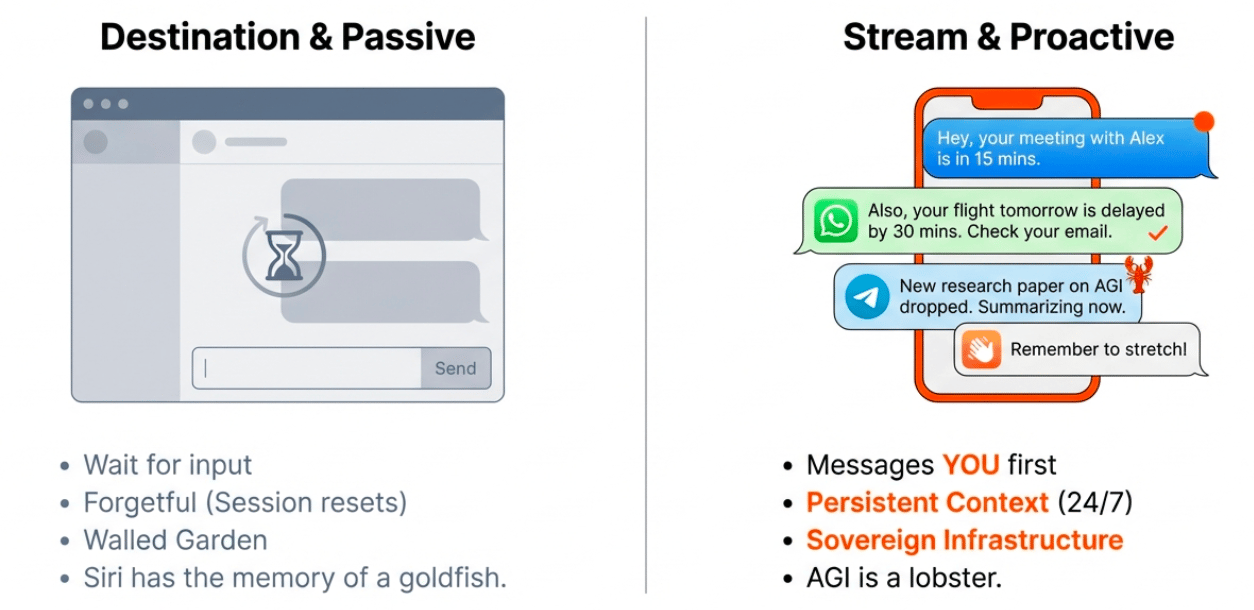
Lives persistently on a computer - It doesn't die between sessions like ChatGPT. It continues running 24/7. This is why people have being buying MacMinis btw - so they have it running nonstop on a little computer. I’ll talk about this momentarily.
Has persistent memory - It remembers all previous interactions, documents you've given it, and tasks you've assigned. It becomes a one-stop-shop for all your work across models, across tools.
Is proactive - This is the big one. It doesn't wait for you to come to it. It reaches out to you. It sends messages, reminders, daily briefs. It nudges you.
It can’t be overstated what a big deal this is. Your AI comes to you when necessary. Rather than you going to the AI.
Hell, the first thing my Clawdbot asked is what timezone I’m in so it doesn’t disturb me!
For instance I have it on WhatsApp sending me messages when it needs things from me. At 9am it might say "Hope you enjoy your morning coffee. You said you wanted to do daily reflections - let's do that now."
This is the promise of Siri. The promise of Jarvis from Iron Man. An AI that constantly knows what's going on, can reach out automatically, can check on you, can be threaded into your life.
It's finally here. That’s why people are losing their shit.
🎯 What Can You Use It For?
What can’t you use it for lol.
Clawdbot has a page dedicated to uses:

Think of Clawdbot literally as an executive assistant. Imagine you’ve just hired a human assistant. What tasks do you give them? That’s up to you and what’s important for you personally.
Some suggestions from me + the showcase.
Personal productivity: Time blocks tasks in calendar based on importance scores. Weekly reviews from meeting transcriptions. Morning daily briefs with weather, health stats, meeting agenda, trending topics, stuff to read based on current objectives.
Content creation: I'm personally setting mine up to deliver a daily AI news brief every morning at 8am. I gave it my last 50 newsletter issues, my news sources, Twitter accounts, subreddits. Every morning it scrapes, filters, and delivers a personalised report. I can then give feedback on which articles were good/bad so it learns.
Health coaching: Set it up as a diet coach that asks how you're feeling about what you've eaten. Record calories via WhatsApp. It keeps memories and reaches out proactively like a personal trainer. If it notices weight trending up it can suggest improvements.
Job applications: Give it your CV, create an email address, provide best practices, access to job portals. Set criteria for jobs you're looking for. It applies 24/7 - a 60-hour task condensed into 30 minutes of setup. Not looking for a job? Set it on outreach.
Any repetitive task over a long period can now be condensed into instructing Clawdbot and letting it go.
The question is now what tasks you need to take off your plate. And how to provide Clawdbot with what it needs.
⚠️ Critical Safety Warning
Do NOT install Clawdbot on your main computer.
I know it's tempting. It's probably what you have at hand. Don't do it.
If you give Clawdbot shell access and something goes wrong, it’ll cheerfully wipe your computer. With the number of people rushing into this, I guarantee we'll have horror stories within the week of someone saying "Clawdbot wiped my system boo hoo" Everyone will laugh and ask "did you give it full access to everything?" And they'll say yes, shouldn’t I have?
Don’t be that guy!
Safe options:
Old laptop - Everyone has one gathering dust. Dig it out, update it, install Clawdbot, run it 24/7.
Raspberry Pi - Get yourself a little mini raspberry Pi 5 and stick Clawdbot on it.
Virtual Private Server (VPS) - Rent a server for $5-10/month. It runs in a data centre (mine's in Germany), on 24/7, not eating your electricity bill. This is what I recommend.
Virtual machine - Sandbox it, protect everything.
Do NOT give it access to your primary machine. Run it isolated.
I’ll run through the VPS method.
🛠️ Setup Guide (VPS Method)
A VPS is a virtual private server. Basically a computer sitting somewhere in a data centre where you can rent a private space.
I'm using Hetzner Cloud - about $5-10/month depending on power needed. There are lots of options - do your research but this is my recommendation.
I’ll give full guide with commands to copy/paste etc on AI with Kyle.
Here's the process:
Step 1: Create Hetzner account and server
Go to cloud.hetzner.com
Create new project
Create server (cheapest option is fine for single instance to start)
~$5/month
Step 2: Create SSH key
This lets your computer talk to your rented server securely
Looks technical but you're just copying and pasting commands into terminal
Step 3: Connect and install
Copy the commands from the guide (see AI with Kyle)
Replace placeholders with your server IP
Press enter after each one
It's literally copy-paste, copy-paste, copy-paste. Looks complex but it’s not really.
Step 4: Connect your interface
Link WhatsApp/Telegram/Slack via QR code
Connect your LLM (Claude API, OpenAI API, or local model)
Add skills as needed
The whole process takes under an hour even if you're non-technical. If you get stuck, paste the guide into ChatGPT or Claude and ask for help.
Someone is going to make a fortune by creating a one-click installer for this. Until then, follow the guide!
→ Full step-by-step guide here
💰 You Don't Need a Mac Mini
Stop. If you're seeing Twitter influencers saying "go buy a Mac Mini to run Clawdbot" - ignore them. Apple's going to have a great week because of this nonsense.
I’ve already stopped 2 people today from dropping £1000 on this! Sorry Apple!

You do NOT need to spend $1,000+ on hardware.
A $5/month VPS handles 99% of use cases. An old laptop works fine. Someone got it running on a Raspberry Pi.
The only reason you'd need a beefy machine is if you're running 50 Clawdbot instances orchestrating together, or running a local LLM that needs serious compute. For most people: absolute overkill.
Will you need a Mac Mini or similar later? Maybe. You can scale into that if you find you need to. BUT you can equally just upgrade your VPS…
Member Question: "Can one Clawdbot connect to two WhatsApp numbers?"
Kyle's response: I didn't know the answer to this, so I WhatsApped my Clawdbot to ask! It didn't know either, but it checked the documentation and found the answer: Yes, Clawdbot supports multiple WhatsApp accounts. Each account gets a unique key and you link each one with a QR code separately. You could have personal plus business numbers both connected.
Member Question: "Is this an add-on for Claude Code?"
Kyle's response: No, it's entirely standalone with an incredibly confusing name. 100% understand the confusion here. Clawdbot (C-L-A-W-D) is not related to Claude (C-L-A-U-D) the AI model. You can connect Clawdbot to any LLM - I happen to use it with Claude Code, but you could use ChatGPT, Grok, Llama, a local model, whatever you want.
Member Question: "I want to use this for job applications."
Kyle's response: Great use case. You have a window right now because the LinkedIn world doesn't know about Clawdbot yet! Go get em. Set it up with your CV, best practices, access to job portals, your criteria. It can apply 24/7. Give it a dedicated Gmail so it can create accounts on job sites. Filter interview requests by your criteria, then bring the good ones to you. A 60-hour task becomes 30 minutes of setup plus oversight.
Want the full unfiltered discussion? Join me tomorrow for the daily AI news live stream where we dig into the stories and you can ask questions directly.