- AI with Kyle
- Posts
- AI with Kyle Daily Update 124

What’s happening in the world of AI:

Highlights
Not much AI news. So I put together a guide on one of my favourite AI tools that very few people use. Every time I show someone NotebookLM, they come back saying "why is nobody talking about this?"
It's free. It's from Google. And it's brilliant for learning or teaching anything.
It’s NotebookLM.

And no this isn’t sponsored by Google. But hey Google if you fancy it hit me up! 🤣
📓 What NotebookLM Actually Is
NotebookLM is different from ChatGPT, Claude, or Gemini. Those tools pull from their massive training data. NotebookLM only works with sources you give it. This is the BIG difference and it makes Notebook very useful at certain tasks - like learning.
You feed it your materials - PDFs, YouTube videos, websites, Google Drive docs, audio files, images - and it does all its work based on those sources. It's grounded in what you provide, not what it was trained on.
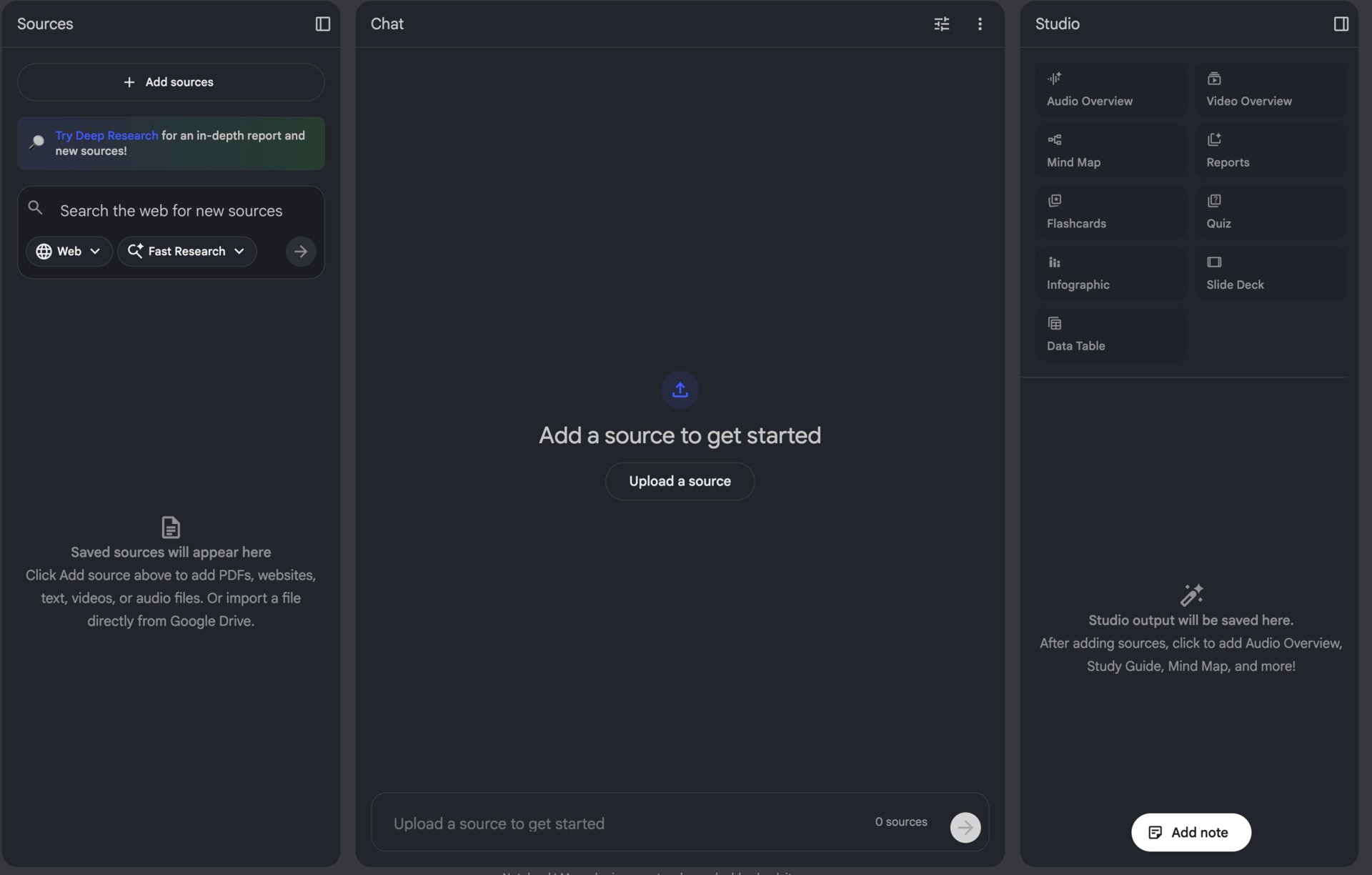
Three panels: Sources on the left (your inputs), Chat in the middle, Studio on the right (your outputs). The magic happens in Studio.
🎯 The Most Important Rule: Garbage In, Garbage Out

GIGO - garbage in, garbage out.
You can add 50 sources per notebook. 25 million words. That's a lot. Like, a lot a lot.
Don't do that silly.
If you just dump everything in, you're basically using ChatGPT with extra steps. The power of NotebookLM comes from curating high-quality sources. Go find the best websites. Find the best YouTube videos. Review them yourself. Then bring them in.
For the live presentation I made about NotebookLM, I used four sources. An official tutorial and a couple of good YouTube videos. That's all I needed to generate everything. Could I have added more? Sure…but at a certain point it’s diminishing returns or even actively harmful.
🎨 What You Can Create in Studio
Studio is where you create outputs. This is where NotebookLM gets REALLY impressive. Fair warning Google are always adding more stuff here. So there will be more than this shortly - but that’s a good thing!
From your curated sources, NotebookLM can generate:
Slide Decks - The presentation I was using in the live was 100% AI-generated. Beautiful slides using Nano Banana Pro. Six months ago, getting accurate text in AI-generated presentations was basically impossible. Now it just works. Get the full slide deck about NotebookLM (meta yes I know…) here: https://aiwithkyle.com/resources/notebook-lm-guide
Audio Podcasts - Two voices (male and female) having a conversation about your topic. You can download it and listen on the go. There's also an interactive mode where you can jump in as a guest and ask questions. You can join the podcast…what sci-fi wizardry is this?
Video Explainers - A video with animations and narration explaining your sources. Similar to the slide deck but fully presented by the AI. Here’s an example:
Mind Maps - Visual breakdowns of concepts from your sources.
Flashcards and Quizzes - Set difficulty, number of questions, specific topics.
Infographics - The infrographic at the top of this guide was generated with NotebookLM. They've just added a "detailed mode" in beta that creates more comprehensive versions.
Briefing Docs, Study Guides, Blog Posts - Various report formats depending on what you need.
It’s a LOT. But…what’s this all actually for?
🎓 How to Actually Use This
I use NotebookLM primarily to learn. The fact that it is constrained to the sources you give it makes it amazing at focused learning.
Watching a video explaining neural nets? Or a video explaining how VC finance works? You can chuck the Youtube video directly into NotebookLM, as well as any other documents and guides you think are useful, and then talk to your sources.
You go from just passively watching or reading to now getting the information in true multimedia. Presentations, videos, audio, voice chat, text chat, flashcards, quizzes etc. etc.
We all learn differently. I learn through visuals. Others need to listen. Some need quizzes to force active recall. NotebookLM lets you create whatever works for you. And you can layer on the learning by hitting a subject from every angle.
If you really want to get advanced though use it to teach.
Richard Feynman said the best way to master something is to teach it. NotebookLM makes this stupidly easy. Create a slide deck. Get on camera. Present it. Post it to YouTube or social media.
That’s precisely what I’m using NotebookLM for. I can spin up a presentation about a topic and start teaching it in minutes. Before I’d need to do the research, prep the structure, build a slide deck and more.
Now? Nah. I can literally sit dow
n in the morning with my coffee, realise there’s not a huge amount of useful AI news and decide on the spot to pivot to teaching a subject. I can grab some sources, throw them into a presentation and hit Go Live. Basically magic.
You're learning the material, cementing it by teaching, and building an audience at the same time. That’s how I use it (and recommend you do too!) but there are many other use cases.
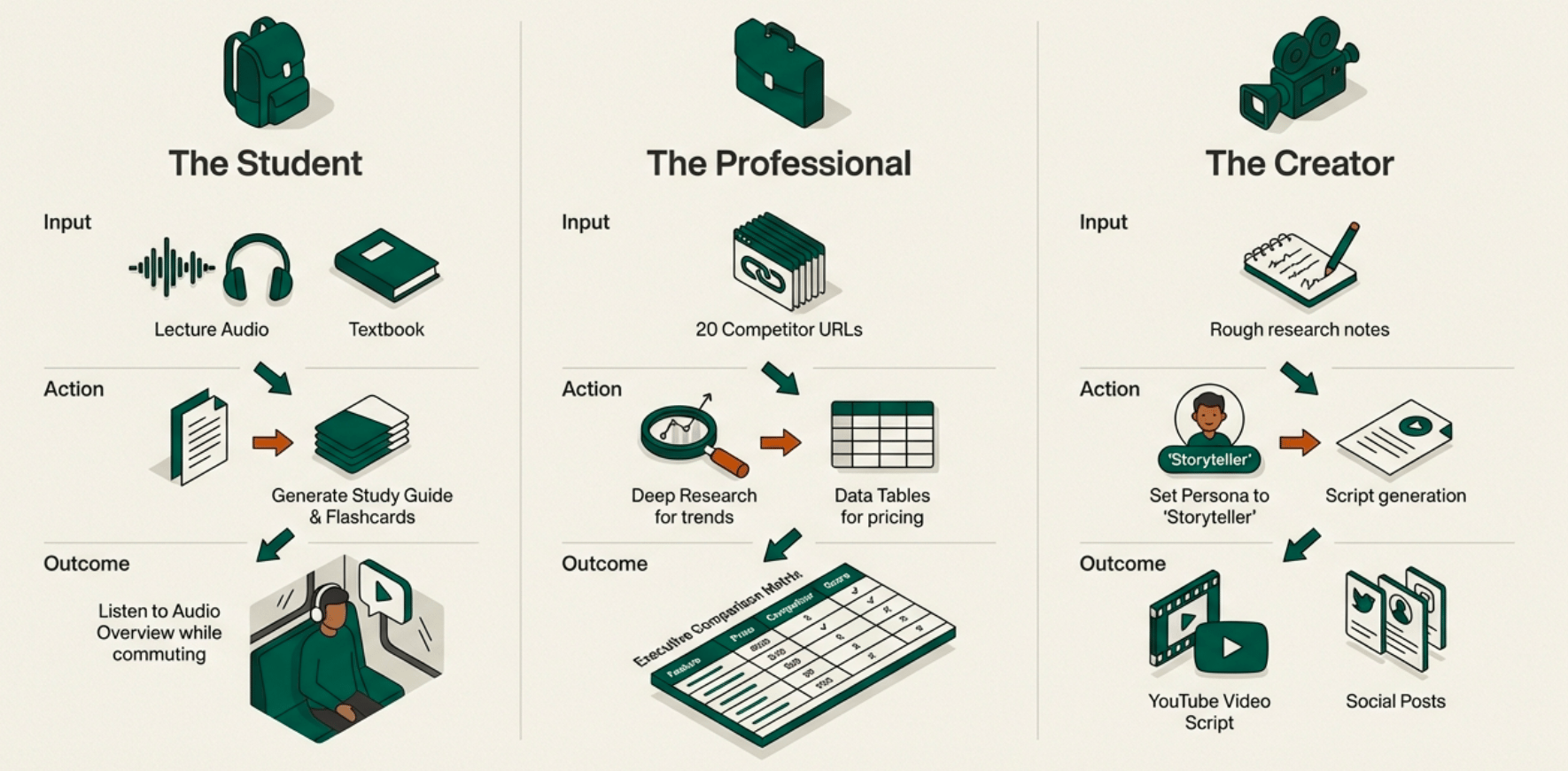
Here are a handful more, thanks for (of course) NotebookLM:
🆓 Is It Actually Free?
Yes. Well, I think so…ha! I tried to find the answer and could not. I've never hit limits on either my personal account or my paid business account. I couldn't even find documentation on what the limits are! → Access NotebookLM
I’ve also put together a resources page with all of this information, the slide deck, the presentation recording and more over on my page. All free of course:
Member Question: "How do you deal with versioning since NotebookLM outputs PDF slides you can't modify?"
Kyle's response: Use Manus. They announced just before Christmas that slides created with Nano Banana Pro are now editable inside Manus. You can select text and edit it, select image elements and change just that part without mucking up the rest. It's the feature NotebookLM should have. I imagine Google will add editing eventually - it's such a killer feature.
Member Question: "What's the path to get into AI for someone with no coding experience?"
Kyle's response: I get asked this so much I built a free challenge for it. Go to aiwithkyle.com, there's a "Get AI Ready in 5 Days" challenge right on the front page. Five days of lessons, totally free. It'll also point you to my other free courses - one about starting a business with AI, one about giving workshops to businesses (I charge about $2,000/hour for those). Plus 90+ playbooks in the catalog.
Member Question: "How to start learning vibe coding for free?"
Kyle's response: Start in the Google ecosystem. Google Antigravity is an IDE that's completely free - came out in December. You get access to Gemini 3 Pro and even Claude Opus 4.5. Alternatively, go to Google AI Studio, click the "Build" button, and you can vibe code there too.
If you don't mind paying a little, Lovable just launched a $5/month plan. If you have money to invest, Claude Code is the best by an absolute mile - but it's $200/month for the Max plan.
Member Question: "Google famous for killing mildly successful products."
Kyle's response: Ha. There's literally a website called killedbygoogle.com tracking this. 299 products murdered so far. Google Domains - gone after nine years. Google Reader - left the market to Feedly who got greedy. That's Google's approach though: lots of teams building lots of things, see what sticks. NotebookLM has reached maturity where I think it's safe to invest time in. But yes, always a risk with Google.
Member Question: "Can Gemini make language learning apps?"
Kyle's response: Perfect timing. Google just released Translate Gemma - open translation models built on Gemma 3, supporting 55 languages, running on devices. If you're building a language learning app, go to Google AI Studio, click Build, and describe what you want. "I want it to be like Duolingo but for [language], with [your unique feature]." You can include the translation model that downloads locally for speaking practice. The Google ecosystem is brilliant for this.
Want the full unfiltered discussion? Join me tomorrow for the daily AI news live stream where we dig into the stories and you can ask questions directly.